Building a Smart AI Chatbot: Step-by-Step Guide for Beginner
Building a Smart AI Chatbot is becoming essential in today’s digital age, as businesses strive to enhance customer interaction and streamline communication. This guide aims to simplify the daunting task of chatbot creation for beginners. Whether you’re a small business owner or simply curious about AI technology, this step-by-step approach will walk you through everything you need to know. You’ll learn how to build your chatbot from scratch using Markleyo AI and discover its vast potential to automate tasks and improve customer satisfaction.
Statistics reveal that companies implementing chatbots can reduce customer service costs by as much as 30%. In addition, chatbots can respond to customer inquiries 24/7, providing immediate support and enhancing user experience. According to a recent survey, nearly 70% of respondents say they prefer to interact with a chatbot for basic queries. With so much evidence pointing to the effectiveness and growing popularity of AI chatbots, there’s never been a better time to dive in. This guide will empower you to tap into this innovative technology through easy-to-follow steps.
Table of Contents
What Is an AI Chatbot?
AI chatbots are software applications designed to conduct conversations with users via text or voice. These intelligent virtual assistants leverage machine learning and natural language processing (NLP) to understand and respond to user inquiries effectively. They’re capable of simulating human-like conversations, making them a valuable asset for businesses. From customer support to lead generation, AI chatbots can streamline a plethora of tasks.
AI chatbots are becoming increasingly sophisticated, capable of learning from interactions to improve responses over time. Imagine having a digital assistant that can quickly adapt to customer preferences and behaviors. This not only enhances user experience but also builds trust and loyalty.
Key Features of AI Chatbots
- Natural Language Understanding: They interpret user inputs and respond appropriately.
- Machine Learning: AI chatbots improve their responses based on past interactions.
- Integration Capabilities: They can easily connect with other platforms (CRMs, social media).
- 24/7 Availability: Provide uninterrupted support for your customers.
Real-World Examples
In retail, brands like H&M use AI chatbots to help customers find products easily. Meanwhile, companies like Sephora offer chatbot assistance to schedule in-store appointments and recommend products based on user preferences.
Why Build a Smart AI Chatbot?
Building a smart AI chatbot isn’t just about keeping up with technology; it’s about enhancing efficiency and user experience. The main advantage is the capability to handle multiple customer inquiries simultaneously. Unlike human agents, chatbots can respond to thousands of customers in real time, significantly improving service levels.
Moreover, with more consumers preferring to interact digitally, it’s essential to adapt. A smart chatbot can gather customer insights, analyze behavior, and provide tailored recommendations, thus allowing businesses to offer personalized experiences.
Benefits of Implementing AI Chatbots
- Cost Efficiency: Reduces operational costs associated with hiring customer service agents.
- Time-Saving: Offers immediate responses to customer inquiries.
- Improved Customer Engagement: Creates a seamless interaction flow.
- 24/7 Support: AI Chatbots support 24/7 without a fraction of time delay.
Case Study
E-commerce companies have reported a 70% jump in sales after implementing AI chatbots by creating personalized experiences based on past interactions. This not only enhances customer loyalty but also boosts sales.
How to Build an AI Chatbot for Beginners?
As a beginner, building an AI chatbot can seem overwhelming. Yet, with the right guidance and resources, anyone can develop a functional chatbot tailored to their needs. The journey begins with understanding the purpose of your bot, whether for customer service, sales, or simply gathering information.
To get started, familiarize yourself with user-friendly platform like Markleyo AI. This platform often comes equipped with tutorials that guide you through their functionalities step-by-step.
Essential Steps in Creating a Chatbot
- Define the Objective: Identify what tasks you want your chatbot to perform.
- Choose a Platform: Based on your requirements, pick a chatbot-building platform that fits.
- Outline the Conversation Flow: Decide how interactions should progress.
Tools for Building Chatbots
- Markleyo: Overall Best for websites, facebook messenger, whatsapp business, and telegram.
- Chatfuel: Great for Facebook Messenger chatbots.
- Tidio: Best for comprehensive and complex conversations.
- ManyChat: Perfect for beginners and marketing-focused bots.
The Steps to Create a Chatbot Strategy
Creating a chatbot strategy is crucial for ensuring that your chatbot fulfills its intended purpose. Establishing a clear plan can effectively guide you throughout the building process.
Step-by-Step Strategy
- Identify Target Audience: Who will interact with your chatbot?
- Determine Use Cases: What specific tasks should your chatbot handle?
- Design Conversation Flow: How will users navigate through inquiries?
Planning Benefits
- Focus: Aligns your development goals and priorities.
- Efficiency: Saves development time by knowing the end goals.
Guide to Building a Smart AI Chatbot AI
Once you’ve laid out your strategy, it’s time to delve into the nitty-gritty of implementation. The first step is to decide on a suitable programming language if you’re coding from scratch or selecting a user-friendly platform if you’re not.
Key Implementation Steps
- Develop Intent Recognition: Make sure your chatbot can understand the user’s intent.
- Integrate Responses: Feed your chatbot with appropriate responses.
- Test: Engage in rigorous testing to eliminate any bugs.
Testing and Feedback Loop
- Peer Testing: Have friends or team members interact with your chatbot to identify weaknesses.
- User Feedback: Post-launch, gather user feedback for continual improvement.
But, it is never an easy task for non developers. For this purpose, markleyo AI has built a platform where users create there own custom chatbots with no coding skills as shown in the next topic.
Step-by-Step Process of Building a Smart AI Chatbot Using Markleyo AI
You need an AI Chatbot, but you do not have development skills to build one for your purposes, and you do not wish to embed the AI chatbot that is pre-built by any company with low to no customization or personalization options, here you come up with Markleyo’s custom solution of building a smart ai chatbot with personalizations according to your needs. The below is a 5-step process showing how to create one custom ai chatbot for yourself:
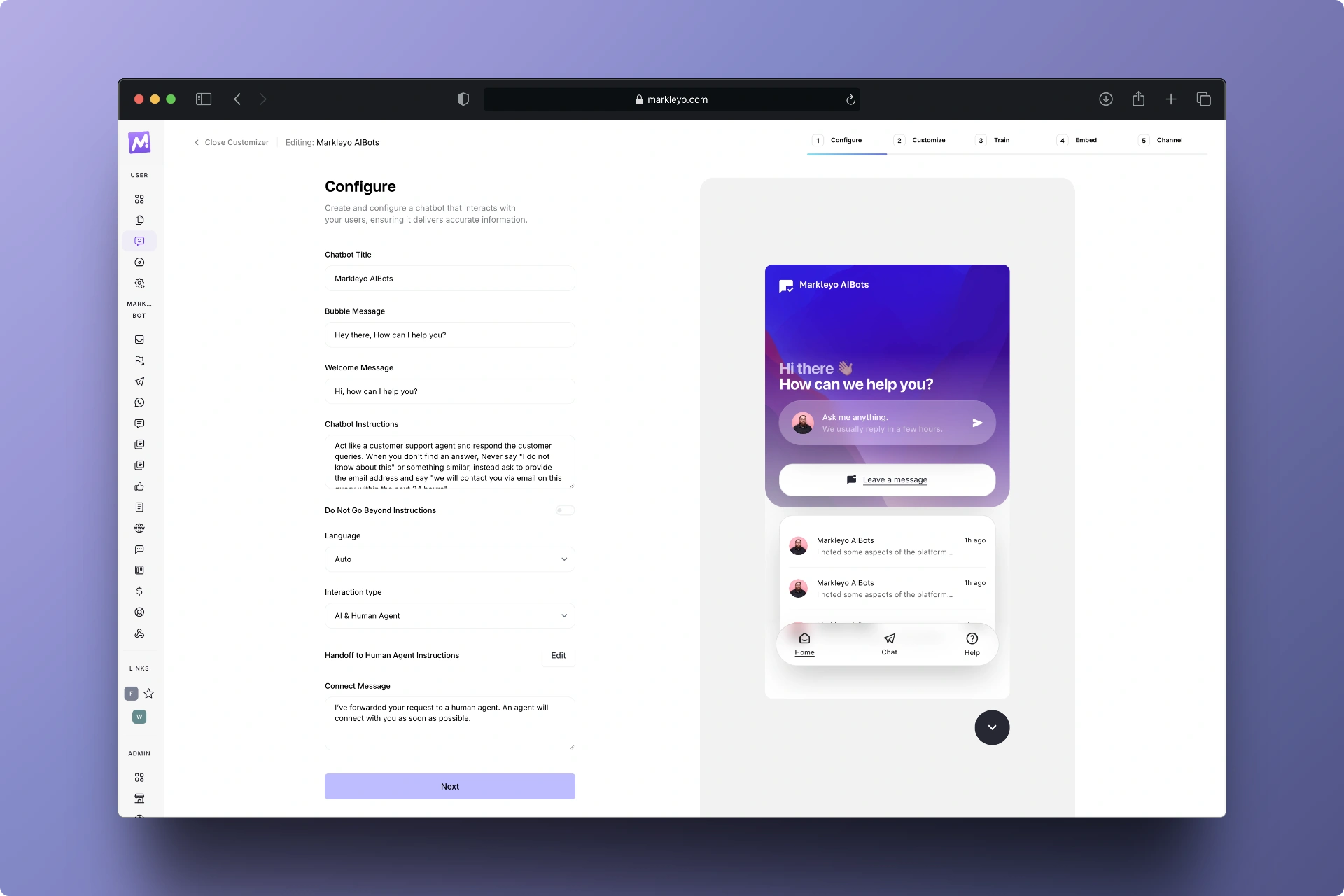
Step 1: Configure
Give your bot a name, choose a bubble message, welcome message that you like for your mode of brand. Give customized instruction to your chatbot, for example; if you have an e-commerce website, instruct it to act like an e-commerce sales manager.
Choose your language (by default it is english or set automatic language so it can pick the language of the customer interacted on your chatbot).
Choose the interaction type. There are 3 modes of interactions:
- AI + Human: if you want your chatbot to respond itself and handovers to human agent for complex inquiries. Instruct with a message to shoot by your AI bot while transferring the chat to human agent.
- AI Only: if you just want your chatbot to respond on autopilot without human interaction.
- Human only: If you want your chatbot to act like a traditional Live chat being supported by human agent.
Step 2: Customize AI Chatbot:
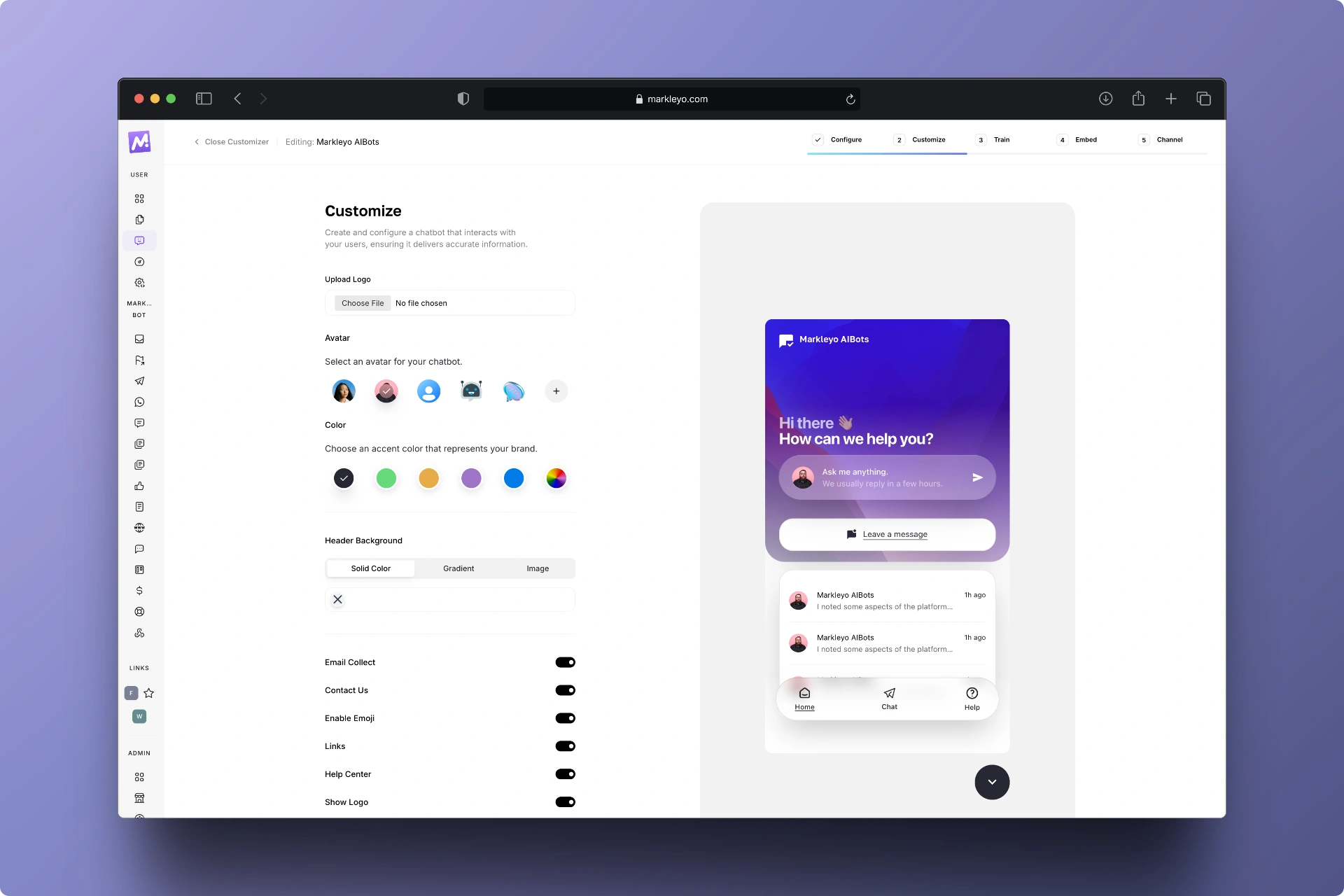
- Customize your chatbot according to your branding, colors, icons, logos, placements, etc.
- Toggle on or off extra features you want to be shown in your chatbot.
- Add links to your whatsapp, telegram, articles to chatbot’s homepage.
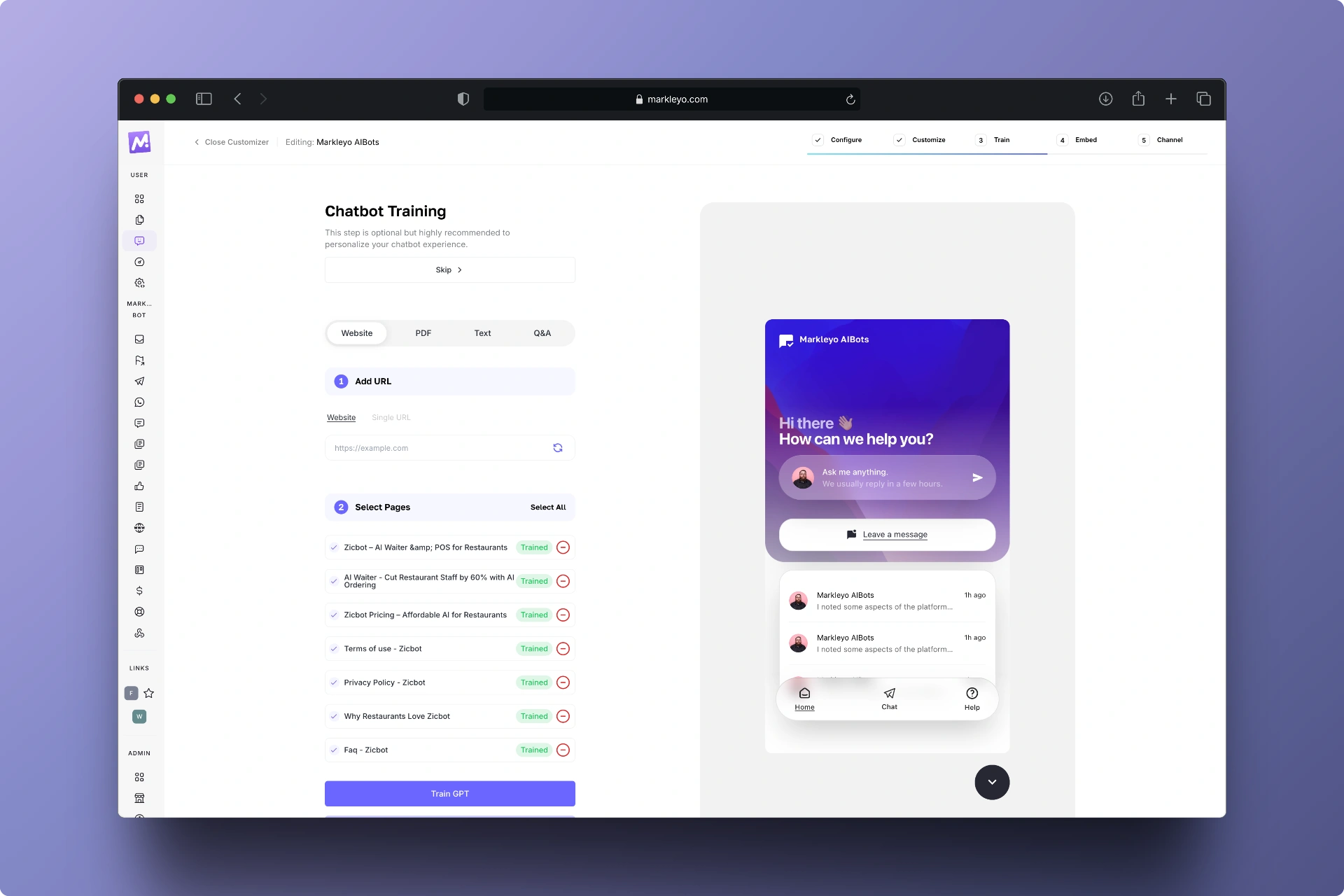
Step 3: Train AI chatbot
There are ways to train your AI chatbot in order to get the great responses on autopilot:
- Website: Just enter your website url, and Markleyo’s AI chatbot will crawl all your webpages and start the training.
- Single URL: Use this option if you don’t want to train all of your webpages. It is best when you just want to train the main pages (service pages) and not the blog posts.
- Train on Your Documents: Upload your pdf, xlsx, or csv documents to get your AI chatbot trained on.
- Text: If your want to add single topics, you can add them in text section.
- FAQs: Add FAQs one-by-one for training. This option is best when your chatbot can’t respond to certain customer queries and you then add them one by one in the future and keep training the chatbot to make it perfect day by day.
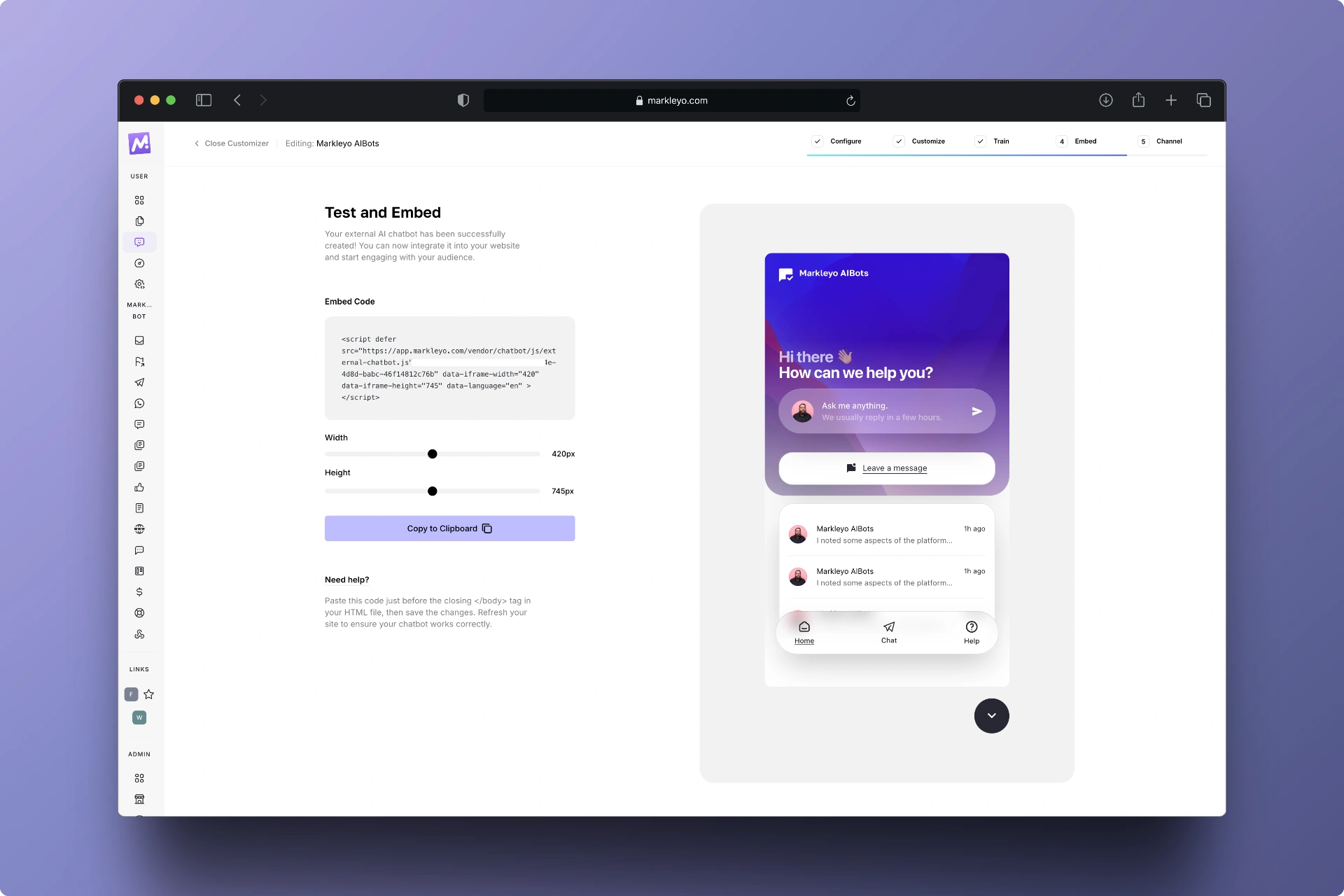
Step 4: Test and Embed AI Chatbot
Copy the embed code and paste it before closing of your website’s body tag.
Notes:
- For WordPress, you can download Markleyo’s plugin and paste the embed code in it.
- You can embed it to any type of website platform, e.g., shopify, php, custom html, custom js, etc.
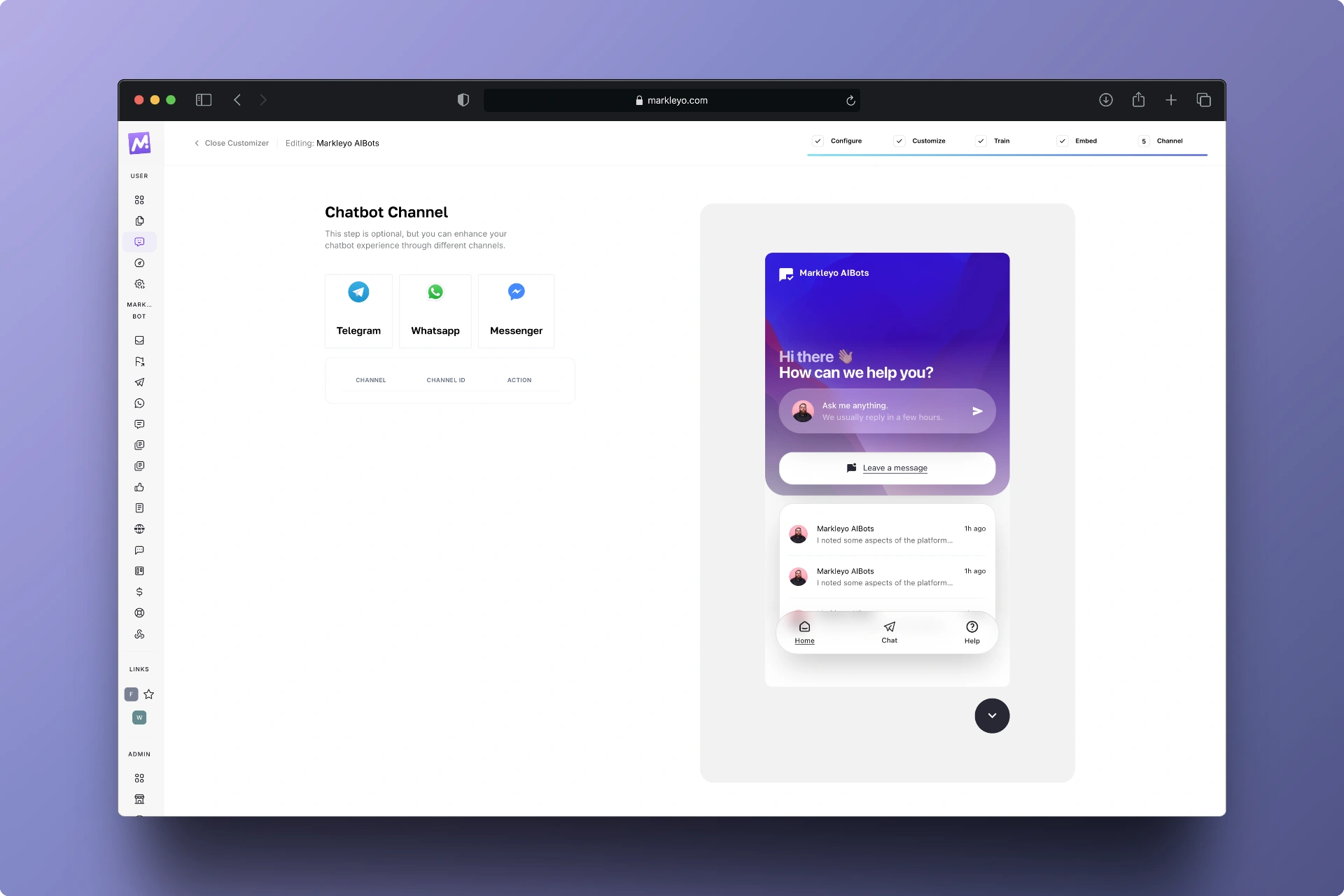
Step 5: Connect With Other Channels (Optional)
You can connect your AI chatbot with your facebook messenger, whatsapp business, and telegram in this step.
Notes:
Whatsapp business connection is powered by Twilio for a better user experience and avoidance of getting flagged.
Advanced Tips for Building a Smart AI Chatbot
After establishing the basics, it’s time to elevate your chatbot to a smarter version. Enhancing the capabilities of your chatbot involves implementing advanced features that enrich user interaction.
Ways to Enhance Your Chatbot
- Utilize NLP for Better Understanding: Implementing NLP allows your chatbot to comprehend varied user expressions.
- Include Emotional Intelligence: Train your chatbot to recognize and react to user emotions for a more personalized experience.
Benefits of Smart Enhancements
- Increased User Satisfaction: More personalized interactions boost user experience.
- Higher Engagement Rates: Users are more likely to engage with an emotionally intelligent bot.
Common Mistakes Beginners Should Avoid While Building a Smart AI Chatbot
When building a smart AI chatbot for your venture, it’s easy to make common mistakes. Being aware of these pitfalls can save you significant time and trouble.
Common Errors
- Overcomplicating Conversations: Keep interactions simple.
- Neglecting User Experience: Always prioritize the user journey.
Tips to Avoid Mistakes
- Keep it Simple: Start with straightforward conversational offerings before expanding features.
- Gather Consistent Feedback: Regularly check in on user interactions to continuously improve.
Final Thoughts
In conclusion, building a smart AI chatbot doesn’t have to be intimidating. By following the outlined steps, even beginners can create effective chatbots that improve customer engagement and operational efficiency. The benefits are numerous, for example; cost savings, time efficiency, and enhanced user experiences are just the tip of the iceberg.
As you embark on this journey, remember to stay adaptable and open to feedback. The world of AI is rapidly evolving, and your chatbot can evolve with it. Embrace the challenge and enjoy the process of creating an intelligent assistant that can significantly impact your business.
FAQs About Building a Smart AI Chatbot
-
What is the primary function of an AI chatbot?
The primary function of an AI chatbot is to simulate human-like conversations by understanding user input and providing accurate, context-aware responses. It helps businesses automate customer support, answer queries instantly, and enhance user engagement without human intervention.
-
How can I choose the best platform for my chatbot?
To choose the best platform for your chatbot, consider your technical skill level, goals, and integration needs. For beginners, no-code platforms like n8n, ManyChat, or Dialogflow are ideal. If you need more customization, opt for open-source or developer-friendly options like Botpress or Rasa.
-
What programming language should I use in building a smart AI chatbot?
The most commonly used programming languages for building a smart AI chatbot are Python, JavaScript, and Node.js. Python is preferred for AI chatbots because of its vast libraries for natural language processing (like NLTK and spaCy), while JavaScript is great for web-based integrations.
-
How can I test my chatbot effectively?
To test your chatbot effectively, simulate real user interactions and analyze responses for accuracy, tone, and context. Use tools like Botium, TestMyBot, or in-platform testing modes to check flow consistency. Gather feedback from real users and continuously refine the chatbot based on insights.
-
How can I start building a smart AI chatbot using Markleyo AI?
You can simply follow the following steps in building a smart AI chatbot using Markleyo AI:
Step 1: Configure your chatbot according to your requirements
Step 2: Customize your chatbot according to your branding
Step 3: Train your chatbot on your URLs, Docs, Text, and FAQs
Step 4: Test and embed your chatbot on your website
Step 5: Connect with Facebook messenger, Whatsapp business (Twilio), and Telegram