
 AI Chatbot for Squarespace
The AI chatbot for Squarespace that never keeps anyone waiting
An AI chatbot for Squarespace is a chat bubble on your site that learns your own pages, then answers visitors on its own. Markleyo reads your Squarespace site, prices and policies, then replies in seconds, books calls and captures every lead. From $14.50/month. One snippet in Code Injection, live in five minutes.



- Trained on your own Squarespace pages
- One snippet, no plugin to install
- Works on 7.0, 7.1 and any template
- From $14.50/mo · 5-day free trial
What can an AI chatbot for Squarespace actually do?
Markleyo is conversational AI trained on your own Squarespace pages, not the open internet. It answers visitors in seconds, works while your team is offline, keeps every chat in one inbox, and passes the hard ones to a human with the full story attached.
One snippet covers your whole site.
Paste it once into Code Injection and the bubble shows up on your home page, your services page, your pricing page and every page you add next month. You never have to remember to add it again, and there is no plugin to keep updated.
It never loses a lead.
Every chat and every captured lead lands in one shared inbox, whether it came from your Squarespace site, WhatsApp, Instagram, Messenger or Telegram. Your team sees the name, the question and the history in one place, so nothing sits unanswered for three days.
It answers the same questions, forever.
Prices, availability, how to book, what is included, delivery, refunds: all answered from your own pages, in seconds, at any hour. Roughly 9 out of 10 of these repeat questions get closed without anyone on your team touching them.
It learns your Squarespace site by itself.
Paste your site URL and it reads your pages, prices, FAQs and policies in minutes. Add PDFs or spreadsheets on top. It answers from that library only, so it will not invent a price or a slot you never had free.
It knows when to call a human.
Odd request, angry customer, a refund worth arguing about? It hands the chat to your team with the whole conversation attached, so your agent starts halfway through instead of asking the shopper to explain it all again.
Why do Squarespace visitors leave without asking?
Squarespace gives a visitor two choices: fill in a contact form and wait, or leave. Most leave. You never learn what they wanted, and your beautiful site takes the blame.
Questions never get asked
- Visitors leave rather than fill in a form
- The same five questions fill your inbox weekly
- Every visitor sees the same static page
- Nobody helps the visitor who is nearly ready
- Replies stop the moment you close your laptop
Every visitor gets a helper
- Instant answers pulled from your own pages
- Explains prices, hours and booking on its own
- Answers the last question before they leave
- Captures every lead and books the calls
- Replies 24/7 in each visitor’s own language
What changes the day
your AI chatbot goes live.
What Squarespace owners see once the AI answers first, in seconds, at any hour, in any language, without waking anybody up.
Averages across websites running Markleyo. Your own numbers depend on traffic, page count and how well the bot is trained.
Best AI chatbot options compatible with Squarespace
Squarespace has no chatbot of its own, and the App Marketplace only carries a handful of chat apps, so nearly everyone pastes in a script instead. That means any provider works. The usual names are Tidio at $29 a month with its Lyro AI another $39, ChatBot.com at $19 to $79 per user plus packs of AI resolutions, Chatbase from $40, and Fin at $0.99 per resolution on a $49 base. Markleyo is flat at $29, or $14.50 for your first term with code EARLY50, with WhatsApp, Instagram, Messenger and Telegram in the same plan. One catch applies to all of them: site-wide Code Injection needs the Business plan. Prices checked in August 2026.
MarkleyoHow to add an AI chatbot to a Squarespace website
One snippet, about five minutes, no developer. You never open a template file or touch your design.
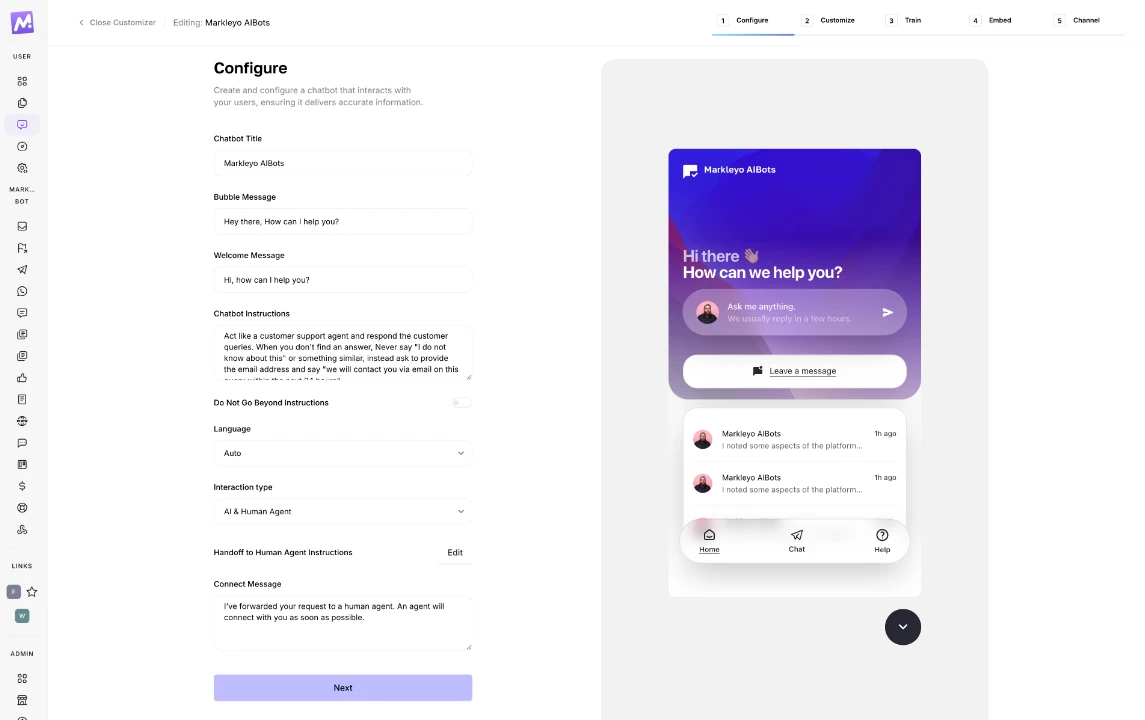
Create your chatbot and set the greeting
Sign up, name your bot, write the first line visitors will see and choose who replies: AI, your team, or both. Nothing here is locked behind a higher Markleyo tier.
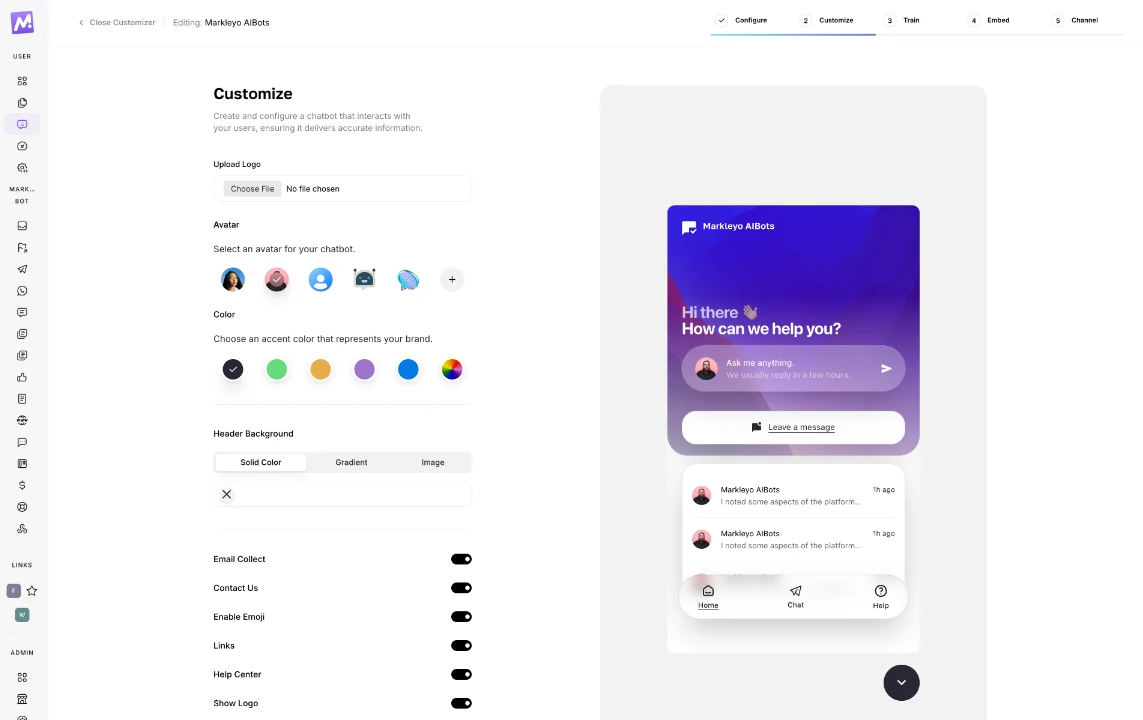
Match it to your template
Drop in your logo, avatar and brand colour, pick which corner the bubble sits in, and switch on lead capture. Squarespace sites live or die on how they look, so the chat should feel like part of the design.
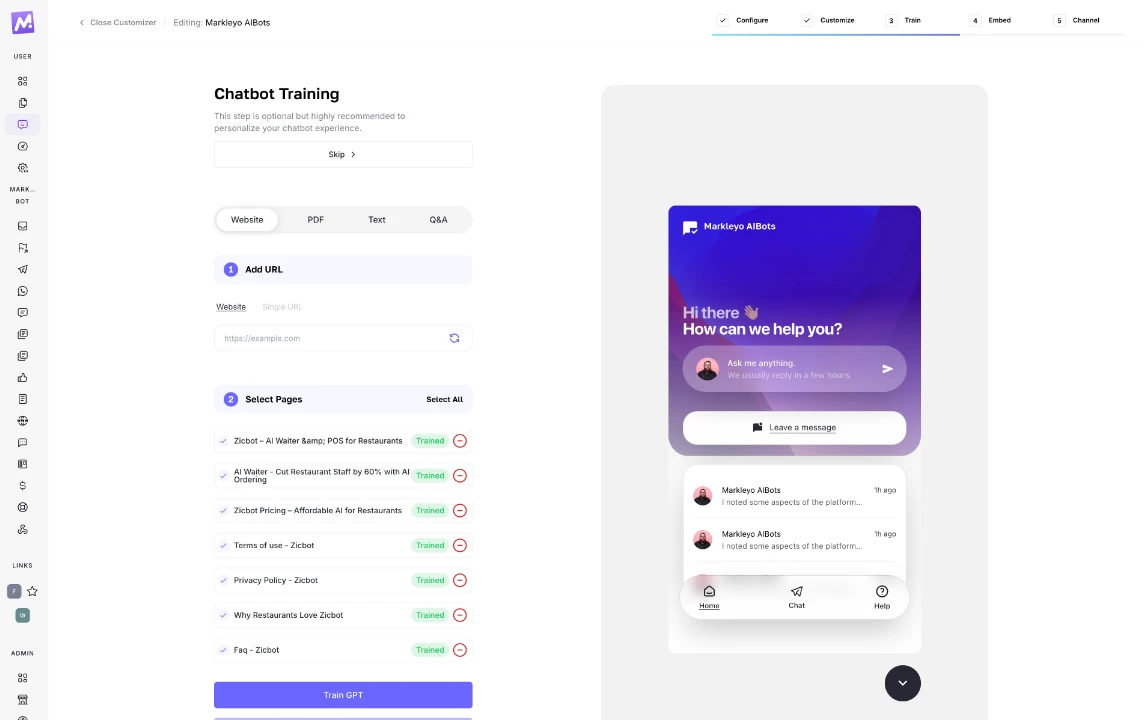
Let it learn your site
Paste your site URL and add any PDFs, spreadsheets, price lists or FAQs you already have. Training takes minutes. After that it answers from your own content only, so its facts match what is on your pages.
Paste the snippet into Code Injection
In Squarespace go to Settings → Advanced → Code Injection and paste your snippet into the Footer box, not the Header. Footer code loads just before the closing body tag, so your pages finish drawing before the chat widget starts. Site-wide Code Injection needs the Business plan or higher.
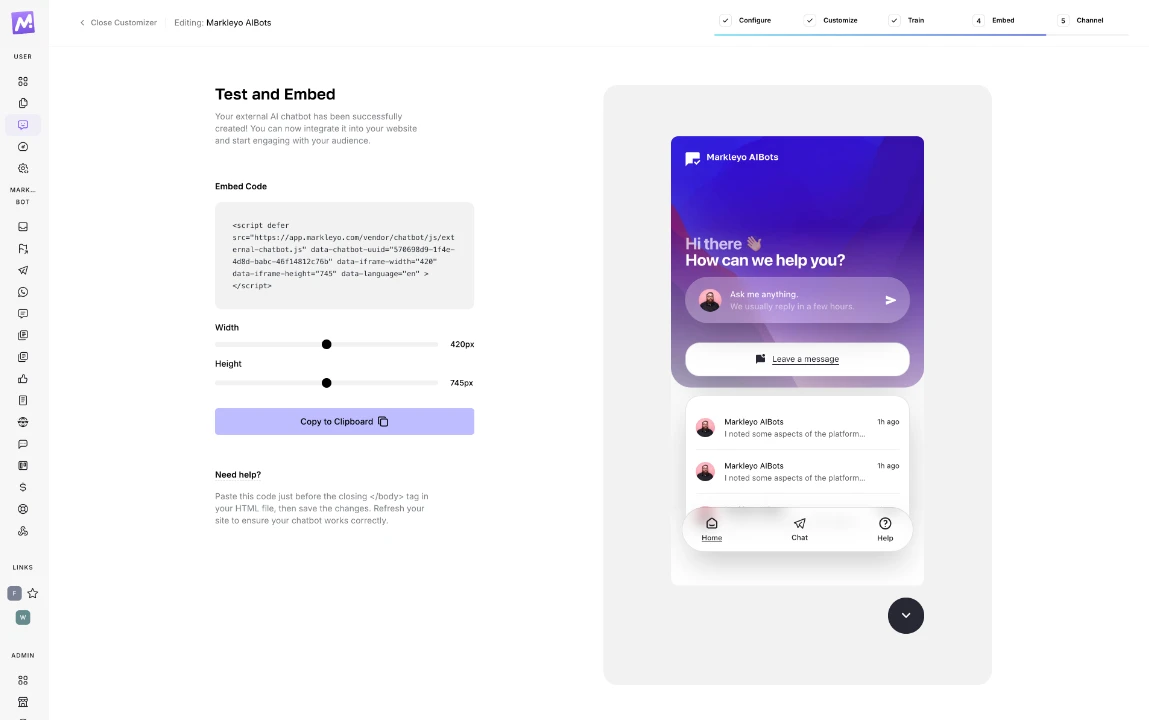
Publish, then add your other channels
Save and publish, then check the site in a private window, because Squarespace caches pages and your editing tab may show the old version. After that, link WhatsApp, Instagram, Messenger and Telegram so one trained bot covers everything, with every chat in one inbox.
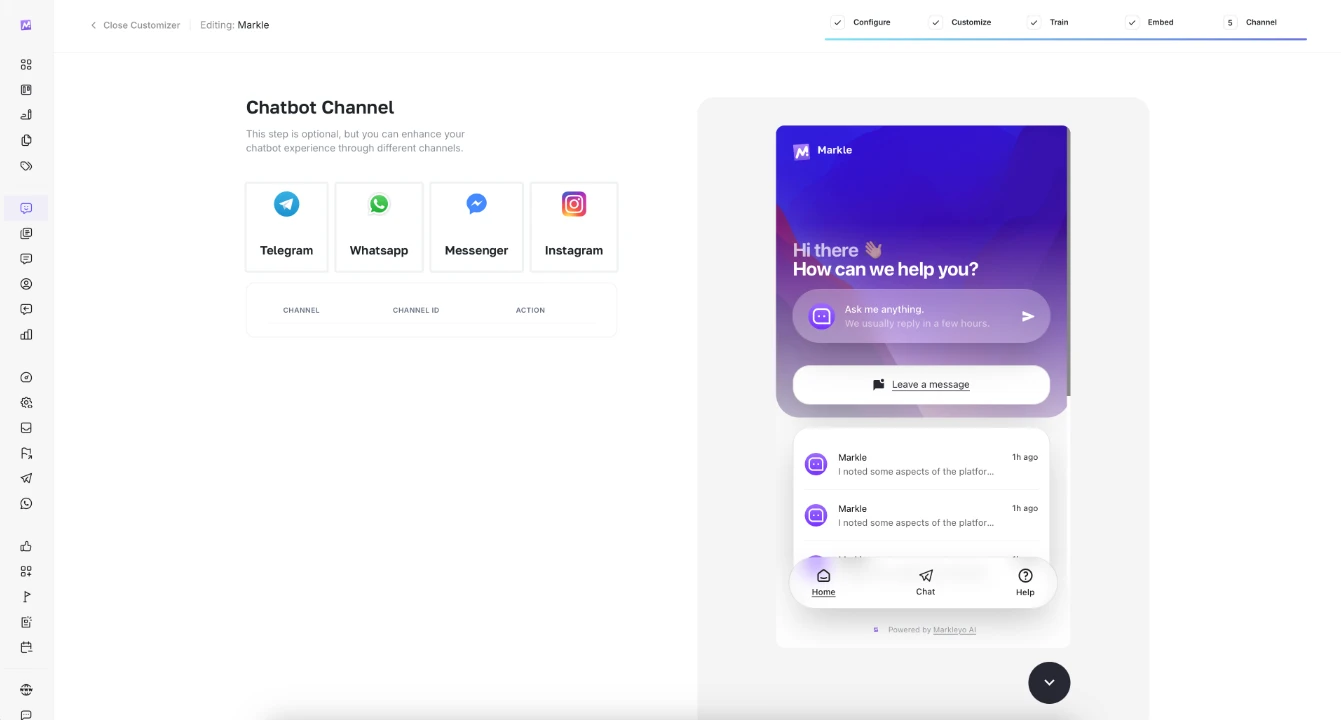
AI chatbot for Squarespace: your questions answered
What Squarespace owners ask us most often before they switch it on, including the plan requirement most guides skip.
Start freeHow do I add an AI chatbot to a Squarespace website?
Copy your Markleyo snippet, then in Squarespace open Settings, go to Advanced, then Code Injection, and paste it into the Footer box. Save and publish, and the chat bubble appears on every page of your site. It takes about five minutes and you never touch a template file.
What are the best AI chatbot options compatible with Squarespace?
Anything that gives you a script tag works, because Code Injection accepts any provider. The usual picks are Tidio at $29 a month plus $39 for its Lyro AI, ChatBot.com at $19 to $79 per user plus resolution packs, Chatbase from $40, and Fin at $0.99 per resolution on a $49 base. Markleyo is flat at $29, or $14.50 with code EARLY50. Prices checked in August 2026.
Which Squarespace plan do I need to add a chatbot?
Site-wide Code Injection needs the Business plan or higher, which includes Business, Commerce Basic and Commerce Advanced. Business is about $33 a month. On the Personal plan the Code Injection option simply is not there, though you can still drop a Code Block onto individual pages.
Does Squarespace have a built-in chatbot?
No. Squarespace has no native chat or chatbot feature, and the App Marketplace has only a handful of chat options, most of them built for bigger teams. That is why nearly everyone adds one with a script tag instead.
Should I paste the snippet in the Header or the Footer?
The Footer. Code Injection has three boxes, Header, Footer and Order Confirmation Page. Header code loads inside the head tag, while Footer code loads just before the closing body tag, so your pages finish drawing before the chat widget starts.
Does it work on Squarespace 7.0 and 7.1?
Yes. Code Injection lives in your site settings rather than in the template, so the same snippet works on 7.0 and 7.1 and on any template you switch to later.
The chatbot is not showing after I saved. What now?
Almost always caching. Republish the site, then open it in a private window rather than the tab you were editing in. If it still hides, clear the cache under Settings then Advanced. Also check the snippet kept its script tags when you pasted it.
Can it answer visitors in other languages?
Yes. It spots the language a visitor writes in and replies in that language, across 70+ languages, so one bot covers every country your Squarespace site reaches.
What happens when a visitor needs a real person?
It hands the chat to your team with the full conversation attached, so your agent picks up halfway through instead of asking the visitor to start again. Everything lands in one shared inbox with your WhatsApp, Instagram, Messenger and Telegram chats.
Turn Squarespace visitors into paying customers.
Add the AI chatbot to your Squarespace site today, publish before you log off, and let it answer your first visitor tonight.
5-day free trial · From $14.50/mo with code EARLY50 · Cancel anytime